Claude Code Rate Limits: Diagnosing my token usage
Every few hours using Claude Code, I hit a wall. Mid-flow, locked out by a rate limit. After burning through roughly 44 million tokens and a $67.58 bill, I finally had Claude dig into logs and diagnose my usage.
Turns out I wasn’t paying for intelligence. I was paying a “memory tax” for conversations that never ended.
The $68 breakdown
In one gigantic session over several days, I made nearly 500 requests. Here’s where the money actually went:
The $68 breakdown
- Building context (Cache Write): $39.95 (67.1%)
- Re-reading history (Cache Read): $17.30 (29.1%)
- Actual AI answers (Output): $2.14 (3.2%)
- New prompts: $0.15 (0.3%)
Only ~3% of my bill went toward actual answers.
The rest? Reminding the AI what we had already discussed.
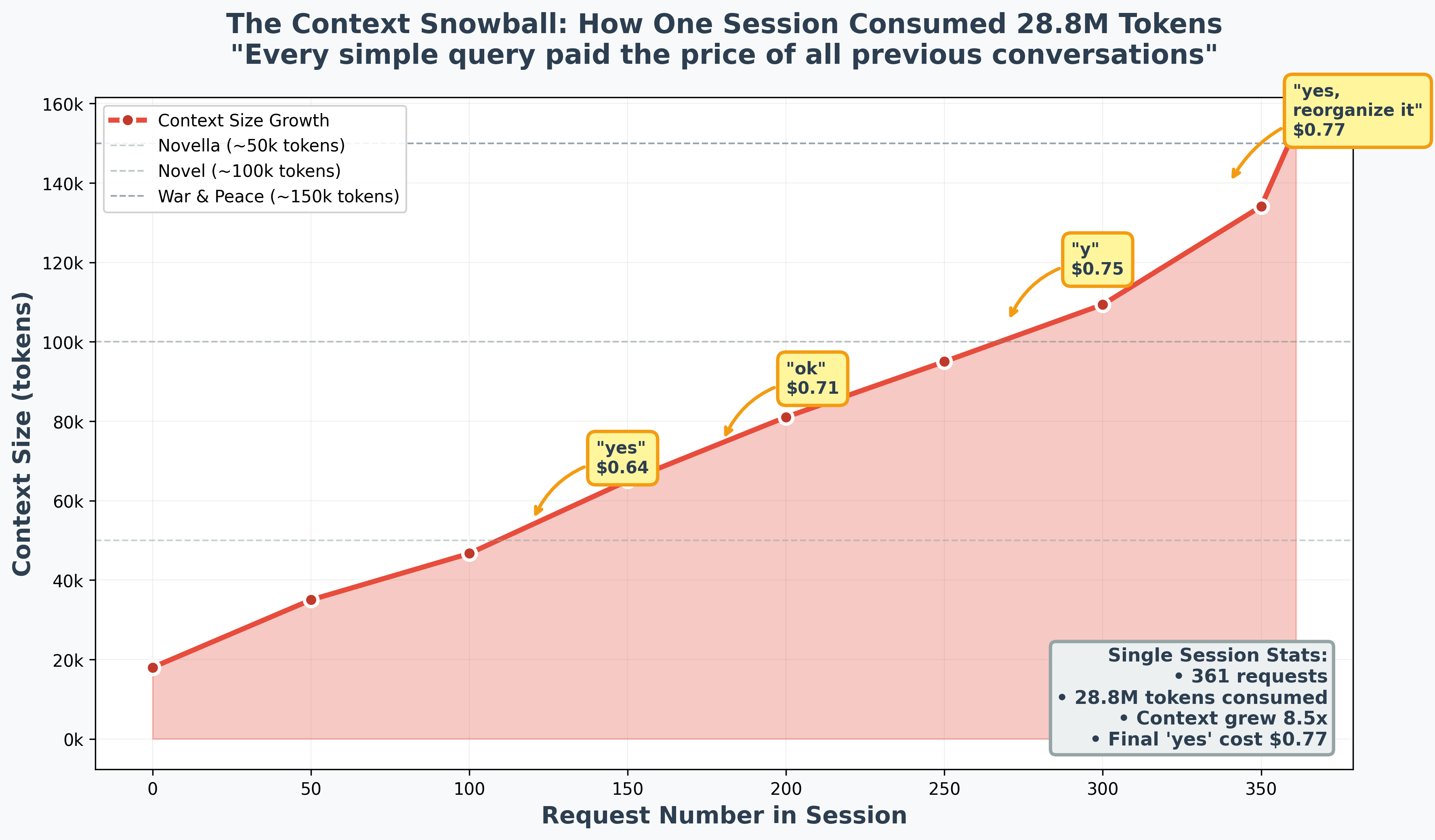
The $0.77 “yes”
The most expensive word I typed was “yes.”
One marathon session hit 361 requests without ever clearing the history. By the end, the context had ballooned to over 153,000 tokens. Because Claude Code re-processes the entire conversation history with every new message, a simple confirmation cost me $0.77. At the start of that same session, it would have cost less than a dime.
I keep coming back to this. Seventy-seven cents to say yes.
The 5-hour rolling window
I used to think limits reset daily. They don’t.
Claude subscriptions operate on a 5-hour rolling window starting from your first use. Exhaust your budget in a heavy two-hour burst of context-heavy work? You’re stuck until that window slides forward.
This explains why I’d be flying through tasks at 2pm, then completely locked out by 4pm despite having “plenty of daily budget left.” There is no daily budget. Just a rolling window that doesn’t care about your flow state.
Why the bill was so high
Three habits caused the bloat:
Marathon sessions: I kept sessions active for days. Every tool call, shell output, and file read became permanent debt that I paid for in every subsequent message.
Task mixing: One session for everything—coding, stock analysis, analyzing my calendar, replying to emails, coding up a breastfeeding tracker, etc. Claude doesn’t need to know my tax-loss harvesting strategy to fix a separate UI bug, but I paid for it to remember both.
Model mismatch: I used Opus 4.5 for every single command. Turns out 66% of my queries—simple things like ls, cd, or moving files—could have been handled by Haiku for 80% less.
My new workflow
I’m changing three things:
Clear context often. I now use /clear or start fresh sessions every 50 requests. Feels wasteful at first, like throwing away perfectly good context. But that context isn’t free—it’s debt.
Match the model to the task. Haiku for navigation and confirmations. Opus only for architecture and deep logic.
Local routing. I’m building a tool to route basic shell commands to a local model (llama3.2:1b). Handles the boring stuff for $0.00.
AI is only expensive if you force it to have a perfect, infinite memory for things that don’t matter.
If this saved you from burning money on context debt, pass it on.